Reports
Your day, your month and every branch, without adding anything up.

Read a report
- 1Open Reports.
- 2Choose the dates and the place, or all of them.
- 3Press Apply.
What each report answers
- Sales: every sale, by day and by place.
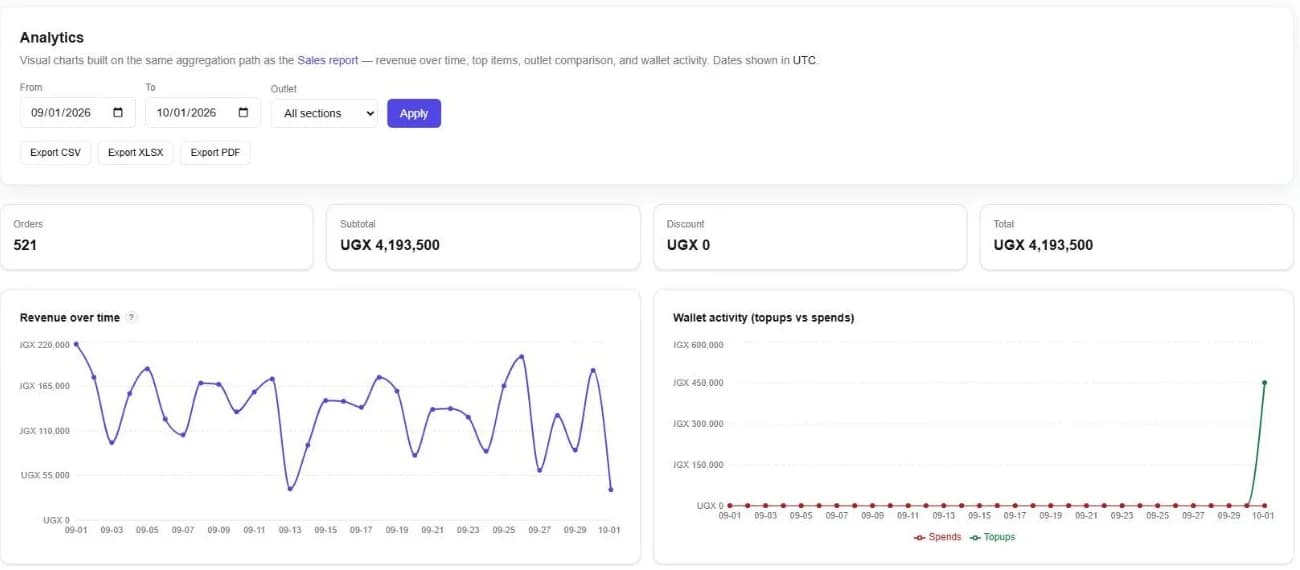
- Analytics: revenue over time, top items, and how each place compares.
- Top performers: your best staff, products and stations.
- Products and margins: what each item earns.
- Revenue and payments: how much came in, by cash, MTN MoMo, Airtel Money, card and wallet.
- Profit and loss: what you made after costs.
- Clients and AR aging: who owes, and for how long.
- Stock summary: what you hold, and what it is worth.
Take it with you
Export any report as CSV, Excel or PDF. A PDF opens on screen first, so you see it before you save it.
Still stuck? Ask us.